Caspa AI was built around one specific idea: put AI-generated human models into lifestyle photos with your product. For brands that need model-in-scene imagery, that is a real capability. But the majority of ecommerce sellers - supplement brands, skincare lines, food and beverage, candles, home goods - do not need a human model in the frame. They need clean product scenes that make the packaging look premium, and they need those scenes to become ad creatives without a second tool. The best Caspa AI alternative in 2026 is built for that workflow: product-first scene generation, built-in ad creation, and a free tier that lets you test before you pay a cent.
Where Caspa AI Falls Short for Packaged Product Sellers
Caspa AI is a capable tool inside a specific use case. When you step outside that use case, three constraints appear immediately.
Built for models, not products
Caspa AI's core feature is placing AI-generated human models into lifestyle photos alongside your product. That is genuinely useful for fashion, apparel, and lifestyle brands that need model-in-shot imagery. But for packaged goods - supplements, skincare, food, candles, home products - adding a human model to a product photo is not the goal. The goal is a photorealistic scene that makes the packaging look like it was shot in a high-end studio. Caspa AI's tool is designed for the wrong output for the majority of ecommerce categories.
No ad creation pipeline
Caspa AI produces lifestyle images - the product in a scene, with or without a model. Those images still need a headline, a benefit callout, a brand layout, and correct aspect ratios before they can run as an ad on Meta, Google Shopping, or TikTok. That design and copywriting session happens in a separate tool after every Caspa export. For sellers running paid campaigns on multiple products, that is a full extra production step per product per campaign.
No free tier - starts at $33 per month
Caspa AI has no free plan. Entry-level access starts at approximately $33 per month for 1,000 image credits. There is no way to test the output quality on your actual product before committing. For sellers evaluating AI photography tools, paying $33 upfront to find out whether the tool produces results good enough for their catalog is a real barrier. Tools that offer a free credit tier let you validate quality on your specific product before upgrading.
What Product-First AI Photography Does Differently
Pixair AI starts with the product, not a model. Upload one product photo and the AI isolates your product from the source image, preserving the label, packaging colors, printed text, and brand name exactly as they appear on the original. The AI only generates what is behind and around the product - the surface, the environment, the lighting - from a plain-language description you write.
Because every scene is generated from a text prompt rather than a preset or model selection, there is no library ceiling. Any surface, environment, or atmosphere you can describe, the AI can generate. White studio for Amazon main images. Dark slate with a cool rim light for premium brand assets. Morning light on oak wood for a clean lifestyle feel. The same prompt applied to every SKU produces a visually consistent catalog where every image looks like it was shot on the same day in the same studio.
From the same upload, the Ad Campaign Generator reads your product label - brand name, product name, key claims, tagline - and produces finished ad layouts with copy written from your actual packaging. No Canva session. No separate copywriting. The gap from product photo to ad-ready creative collapses to a single session.
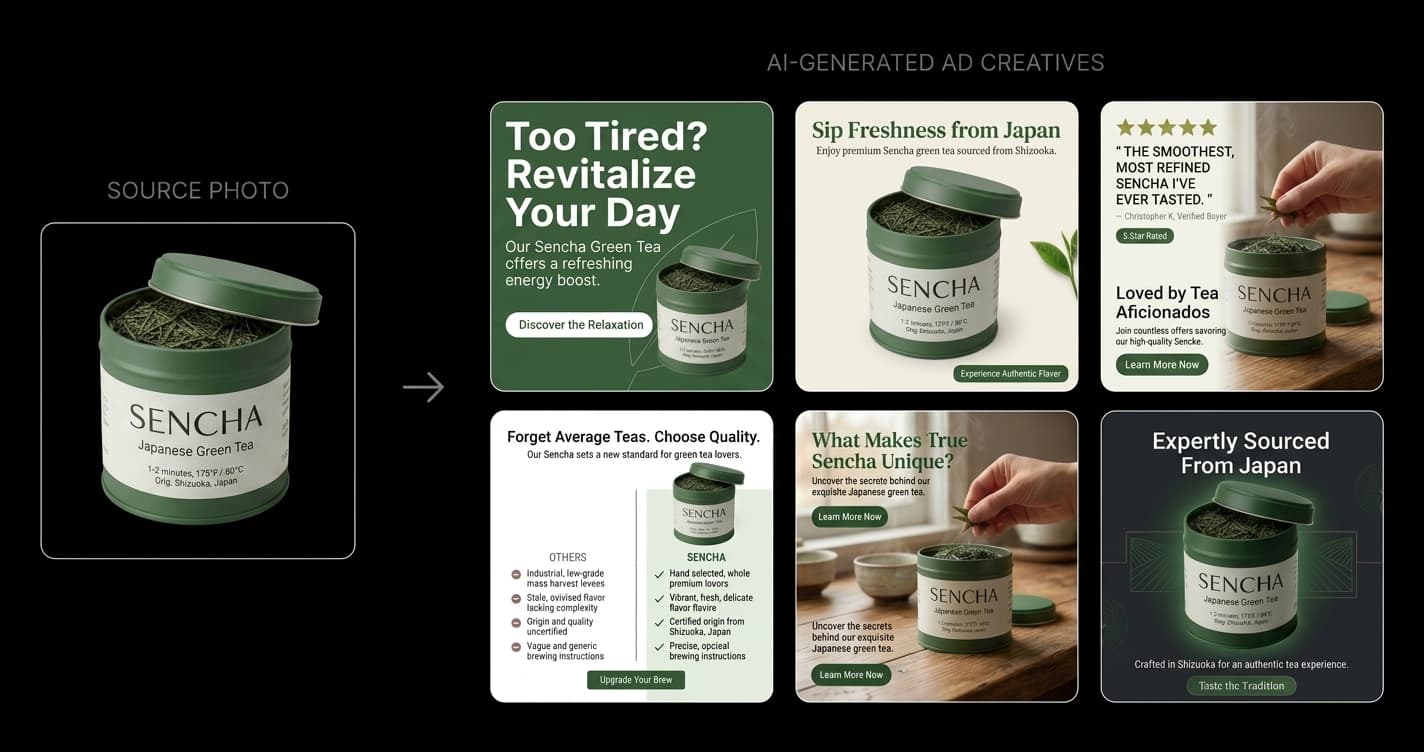
One product upload. The AI reads your label, writes the copy, and generates finished ad creatives - no model, no second tool.
Step-by-Step: From One Product Photo to Finished Ad Creatives
This workflow replaces the Caspa AI session plus a separate design and copywriting session with a single Pixair AI session that ends with export-ready creatives.
Photograph the product on any flat surface
Place your product on a white or light grey surface near a window. A phone camera is sufficient - scene generation quality is determined by the AI, not source resolution. Make sure the full product silhouette is within the frame with a small margin around all edges. One front-facing photo per SKU is all you need.
Upload and describe your scene in plain language
Upload the photo to Pixair AI and write a scene description: “dark slate surface, single cool rim light from the left” or “white marble, soft diffused morning light” or “light oak wood table, warm window light from above.” You are generating the environment from scratch - not selecting from a library - so you can describe any scene your product would look good in.
Generate three scene types per SKU
Run three prompts per product: a pure white studio background for marketplace main images, one lifestyle scene matching your brand mood, and one premium editorial scene for ads and social. Each generation takes under 30 seconds. Generate 2-3 variations per prompt and keep the best. Three scene types with multiple variations takes under 20 minutes per SKU.
Run the Ad Campaign Generator from the same upload
Switch to Ad Campaign Generator without re-uploading. The AI scans your product label from the same photo - it reads the brand name, product name, key claims, and tagline printed on the packaging. Select Dark Ad for premium or brand-forward products, Light Ad for clean-label or ingredient-story products. Choose the aspect ratios you need: 1:1, 9:16, 16:9, 4:3, 3:4. The AI writes the copy and composes the layout for each format.
Export and reuse the prompt across your catalog
Download all formats. They are ready to upload directly to Meta Ads Manager, Google Ads, or TikTok Ads - no further editing required. Copy the scene prompt that produced the best result and paste it for every subsequent SKU upload. Every product in your catalog gets generated into identical lighting and atmosphere, producing a visually consistent image library.
Caspa AI vs. Pixair AI for Product Photography
Caspa AI
Model-centric lifestyle photography

Product-first AI photography
Caspa AI
Model-centric lifestyle photography
Product-first AI photography
Product scene generation
Templates and model-in-scene approach - not optimized for clean product-only environments
Text prompt generates any scene from scratch - surface, lighting, and atmosphere you describe
AI human models
Core feature - places realistic AI models in lifestyle shots with your product
Not available - focused on product scenes without models
Ad creative generation
Not available - lifestyle images require separate design tool and manual copywriting before ads can run
Built-in Ad Campaign Generator - 6 ad formats per upload, copy written from your product label
Copy writing
Manual - you write all headlines, callouts, and body copy after exporting the image
AI reads your product label and writes product-specific copy automatically
Time from upload to ad-ready creative
60+ min - lifestyle session plus separate design tool layout plus manual copywriting
Under 10 min - upload, generate scenes, run Ad Campaign Generator, export
Product label accuracy
Depends on model placement - label may be partially obscured or at an angle
Label preserved pixel-accurate - product is never regenerated, only the scene around it
Catalog consistency
Difficult to replicate exact scene conditions across multiple SKUs
Copy the same prompt for every SKU - identical lighting and atmosphere across the full catalog
Pricing
From $33/month - no free tier, no trial credits
Free to start (30 credits), from $24/month - scenes, background removal, upscaling, and ad creation included
See Pixair AI pricing - all plans include AI scene generation, background removal, upscaling, and ad creation. Free tier available, paid plans from $24/month. Also comparing other tools? See Pixair AI as a Pebblely alternative and a Flair AI alternative.
What Does a Month of Ad-Ready Images Actually Cost on Each Tool?
The sticker prices - $33/month for Caspa AI, $24/month for Pixair AI - understate the real gap, because Caspa's output is not ad-ready. Say you run 5 SKUs and want 4 ad creatives per SKU each month. On Caspa, generating the lifestyle images is only step one; each of those 20 creatives still needs a layout, a headline, and export sizing in a separate design tool. At a conservative 20 minutes per creative, that is roughly 7 hours of design work per month, plus the design tool subscription - on top of the $33.
On Pixair AI the same 20 creatives come out of the Ad Campaign Generator with copy and layout already composed, so the marginal cost of each additional creative is about a minute of generation time. The practical difference is not $9/month - it is whether a monthly creative refresh across your catalog takes an afternoon or a week of scattered sessions.
When Is Caspa AI Still the Right Choice?
An honest comparison cuts both ways. If your brand sells apparel, jewelry, or accessories where the product only makes sense on a person - a necklace on a neckline, sunglasses on a face - Caspa AI's AI-model placement is the feature you are paying for, and Pixair AI does not replicate it. The switch makes sense specifically for packaged-product sellers: supplements, skincare, food and beverage, candles, home goods. If your product photographs on a surface rather than on a body, a model-centric tool is overhead you are funding but not using.
5 Tips for Getting the Most Out of Pixair AI After Caspa
Describe surfaces and light - not moods or styles
The mental shift from Caspa AI is moving from model and preset selection to writing physical descriptions. Specific surface and light direction prompts produce far more consistent results than vague mood descriptions. Instead of “luxury lifestyle,” write “dark wet slate surface, single cool rim light from the upper left.” Instead of “clean and minimal,” write “pure white background, neutral diffused studio light.” The AI needs physical constraints, not emotional ones.
Shoot with the label fully facing the camera
Pixair AI reads your product label directly from the uploaded photo. For the Ad Campaign Generator to extract the brand name, product name, and key claims accurately, the label must be clearly visible and legible in the source photo. Shoot front-facing with the label centered. A clean, fully visible label in the source photo means better copy extracted and more accurate ad creative output.
Generate both Dark Ad and Light Ad for every product
Dark Ad suits premium, brand-forward, and supplement products. Light Ad suits clean-label, ingredient-story, and skincare products. Generate both for every SKU in the same session - it costs no extra time and gives you two distinct creative directions to test. Different ad sets perform differently by platform, audience, and time of day. Having both formats in your library from one session doubles your testing inventory without doubling production time.
Lock your scene prompt once it works
Once a prompt produces the right result for your brand - the surface, the lighting, the shadow quality - save it and paste it verbatim for every new SKU upload. Do not tweak it per product. The value of a consistent prompt is that every product in your catalog looks like it was shot on the same day in the same studio. That visual consistency is what makes a catalog look like a real brand and not a collection of separately produced images.
Use the white studio prompt for all marketplace main images
For Amazon, Shopify, or any marketplace that requires a white background, use this exact prompt: “pure white background, neutral diffused studio light, product centered.” This produces the RGB 255/255/255 white background that Amazon main image requirements specify, and the neutral light matches the standard studio look marketplace shoppers expect on main images. Run this prompt first for every product, then run the lifestyle and premium scene prompts after.







Frequently Asked Questions
No. Pixair AI is a product-first tool - it generates scenes around your product without adding human models to the frame. If your primary need is lifestyle shots with AI-generated models wearing or holding your product, Caspa AI is built for that specific use case. If your need is clean product scenes, background replacement, and ad creative generation without models, Pixair AI is the better fit.
Yes. Pixair AI includes a free tier with 30 credits - enough to generate a full image set for 2-3 products and test the Ad Campaign Generator on your actual packaging. No credit card is required to start. Caspa AI has no free tier and requires a paid subscription from the first use.
Pixair AI reads your product label directly from the uploaded photo. It extracts the brand name, product name, key ingredients or claims, volume, and any tagline printed on the packaging. You do not fill in a form or write a brief. If the label is clearly visible in the source photo, the AI derives everything it needs from your actual packaging and writes copy specific to your product - not a generic template.
No. Scene generation in Pixair AI requires writing a short text description of the environment you want. The Ad Campaign Generator requires no prompting at all - upload, select style and format, generate. One or two sessions is enough to settle on a scene prompt formula that works for your brand. From that point, the workflow is: paste the same prompt, upload the next SKU, export.
Pixair AI produces the best results with packaged goods that have a defined silhouette and a visible printed label - supplements, skincare, food and beverage, candles, home goods, and similar categories. Products with complex reflective surfaces like clear glass or polished chrome are more challenging. The category where AI photography struggles most is fully transparent packaging where the background is visible through the product itself.
Keep reading
Related articles
Amazon Product Image Generator: Compliant in 4 Steps (Free)
Turn one phone photo into an Amazon-compliant main image (RGB 255/255/255, 85% fill, 2,000 px) plus lifestyle images for all 9 slots. Free with 30 credits.
AI Product Photography for Amazon Sellers - Full 9-Image Sets
Amazon suppresses non-compliant listings and ranks by CTR. See how AI product photography handles white background compliance, lifestyle secondary images, and full 9-slot image sets - no photographer.
Best Flair AI Alternative - Skip the Canvas, Get Ready-to-Run Ads
Flair AI uses a drag-and-drop canvas. Pixair AI turns one product upload into six ready-to-run ad creatives - copy written, layouts composed, no canvas required.