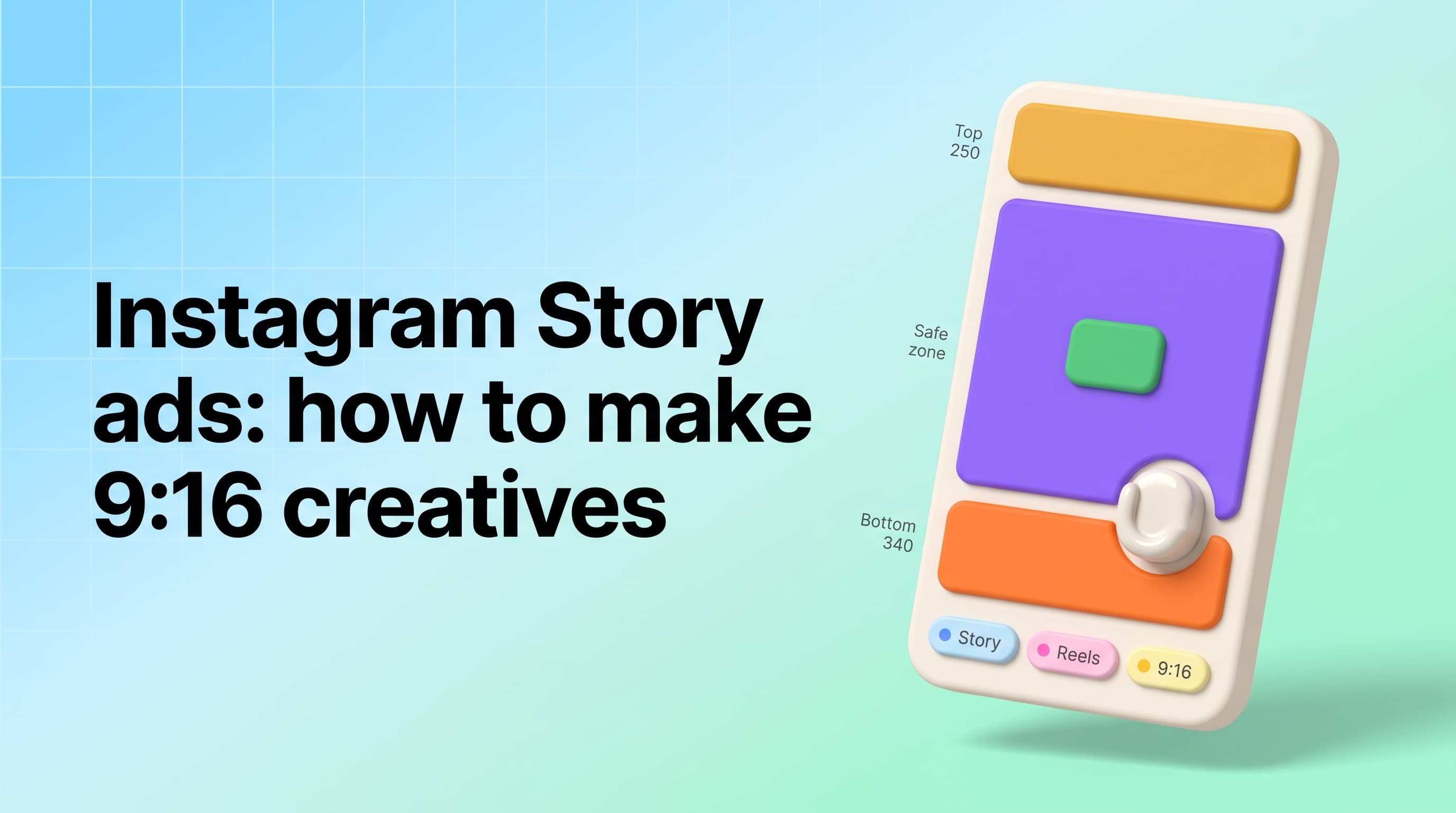
An Instagram Story ads generator turns one product photo into full-bleed 1080x1920 ad creatives built for the Story and Reels placement, instead of square feed images stretched to fit a vertical screen. The difference is not cosmetic. Meta reserves roughly 590 pixels of every Story frame for its own interface, which leaves about 69% of the canvas genuinely safe for your product, your headline and your offer. In Pixair AI you upload a product photo, pick a Story-shaped preset, and the ad is composed at 9:16 from the start for 4 credits - about $0.18 per creative.
What Is an Instagram Story Ads Generator?
It is a tool that composes ad creative directly in the 9:16 frame rather than adapting something built for a different one. You will see the same category called a Story ads maker or a Story ads creator; the useful distinction is not the name but whether the output is generated at 1080x1920 or resized into it after the fact.
That sounds like a technicality until you look at what fills the frame. A Story ad is the only Meta placement that occupies the entire screen with no feed around it, no caption underneath, and no competing post above. It gets the viewer's whole attention for as long as they stay - and the median stay is short enough that the composition has to work at a glance. Resized square creative arrives with a product in the middle, empty bands top and bottom, and a headline sitting exactly where Instagram draws its own interface.
Why Do Feed Creatives Fail as Story Ads?
Because two separate losses stack. The first is fill: a square creative centred in a 9:16 frame covers 1,080 of 1,920 pixels, so 44% of the screen you paid for is blurred backdrop or flat colour. The second is the safe zone: Meta draws the profile row across the top of a Story and the call-to-action sticker across the bottom, and anything you place underneath either one is obscured on a real phone even though it looked fine in the ad manager preview.
Meta's published guidance is to keep text and logos clear of the top 250 pixels and the bottom 340 pixels in Stories, and clear of the bottom 420 pixels in Reels where the caption and audio row sit higher. Those are the inputs. The usable area is the number nobody publishes, so here it is calculated out:
| Placement | Canvas | Reserved top | Reserved bottom | Safe area | Usable |
|---|---|---|---|---|---|
| Instagram Story ad | 1080 x 1920 | 250 px | 340 px | 1080 x 1330 | 69% |
| Instagram Reels ad | 1080 x 1920 | 250 px | 420 px | 1080 x 1250 | 65% |
| Feed portrait (4:5) | 1080 x 1350 | None | None | 1080 x 1350 | 100% |
| Square reused in Stories | 1080 x 1080 in frame | - | - | 1080 x 1080 | 56% of screen |
Read the last row against the first. A square repost fills 56% of the screen, and a native Story ad has 69% of a full screen available for content - so the native creative gets roughly a quarter more working area while also filling the parts the square one leaves blank. That gap is why Story performance so often reads as a placement problem when it is really an aspect-ratio problem.
The practical rule that falls out of the table: design into the middle 1080x1330, and treat the top and bottom bands as bleed. Background can run into them. Product edges can run into them. Price, offer, logo and headline cannot.
How Do You Make Instagram Story Ads From One Product Photo?
Four steps, and the only asset you need is a photo of the product on any background.
Upload the product photo
A phone photo works. Built-in background removal cuts the product out, so a cluttered desk or a white studio sweep both end up in the same place - an isolated product ready to drop into a new scene.
Pick a Static Ads preset
Each preset is a full art direction, not a template with a slot. Benefit Burst builds a claim-led layout, Us vs Them sets up a side-by-side comparison, Clinical Mono goes stripped and clinical for supplements and skincare, and Real Results frames a before-and-after. The scene is generated fresh around your product every time, so two brands running the same preset do not produce the same ad.
Set the output to Story / Reels
Instagram is a preset platform target with Story / Reels at 1080x1920 alongside the square, portrait and landscape sizes. Choosing it before you generate is the whole point - the composition is laid out for the tall frame rather than cropped into it afterwards.
Generate the slate, not the ad
One Story ad is a guess. Six is a test. Static ads run 4 credits each and campaign presets, which produce a matched multi-ad set in one pass, run 3 credits per ad - so a six-variant Story slate costs 24 or 18 credits depending on which route you take.
What Does an Instagram Story Ad Cost to Make?
At 4 credits per static ad and $0.045 per credit on an annual plan, a native 9:16 Story creative costs $0.18. A six-variant slate is $1.08. The 30 free credits a new account starts with cover seven Story ads before any card is involved, which is enough to run a first test and see whether the format moves anything.
Designer or Story template kit
Brief, resize, revise

Pixair AI
Designer or Story template kit
Brief, resize, revise
Pixair AI
Cost per Story creative
$40 - $120
$0.18
Six-variant Story slate
$240 - $720
$1.08
Turnaround
2 - 5 days
Under 60 seconds
Composed at 1080x1920
Usually resized from square
Native, before generation
Cost of a revision
Billed again or queued
Regenerate for 4 credits
Background swap for a new scene
New brief
Included in every preset
The number that changes behaviour is the revision line. When a Story variant costs $0.18, killing one is free of consequence, and the whole argument for testing six concepts instead of defending one stops being a budget conversation. That is the same economics behind creative A/B testing generally, applied to the placement where most brands still run a single recycled asset.
Which Story Ad Variations Should You Test First?
Stories reward a different first frame than the feed does. There is no caption to lean on and no scroll pause - the ad either states its case in the top two thirds of the screen or it gets tapped past. These six concepts cover the range that usually separates a winner from the rest:
- Product at scale. The item filling most of the safe area, no scene competing with it. The control every other variant is measured against.
- Claim-led. One benefit set large in the upper third, product below it. Reads before the viewer has consciously decided to look.
- Comparison split. Two halves, yours against the alternative. Works especially well vertically, where the split can run top to bottom instead of side to side.
- In-scene lifestyle. Product in the environment it is used in, shot tall so the room does the framing.
- Offer-first. Price or promotion as the dominant element. The one to run when the audience already knows the brand.
- Before and after. Two states stacked vertically. The vertical frame suits this better than the feed does, and it is the concept most likely to hold a viewer past the first second.
Run all six against one audience, let them spend, and keep the two that earn it. If a static concept proves out and you want the Reels inventory too, the cheapest next step is not a shoot - it is rebuilding the winner as an animated static, which keeps the layout that worked and simply assembles it on screen.
Five Rules for Story Ads That Do Not Get Tapped Past
Put the offer at 40% height, not centre. Centre feels right on a desktop preview and sits low on a phone once the CTA sticker is drawn. Anchoring the headline slightly above the midpoint keeps it clear of the bottom band on every device size.
Let the background bleed, never the text. Backgrounds that run to all four edges are what make a Story ad feel native. The moment a white margin appears at the top, the ad reads as a repost from somewhere else.
Design for sound off and thumb near the bottom. The viewer's hand covers the lower quarter of the screen while they hold the phone. Anything you need read has to survive both a muted playback and a partially occluded bottom edge.
One idea per frame. Feed ads can carry a headline, a subhead and three feature callouts because the viewer can dwell. A Story cannot. If you need a second point, make it a second Story ad and let the platform sequence them.
Refresh on a four-week clock. Story inventory burns through frequency faster than feed at the same budget because each impression is a full-screen exposure. Have the replacements rendered before CPM starts climbing, not after. The wider feed workflow in the Instagram ad creatives guide pairs with this one - feed and Stories want the same product photo and different compositions.
If the concept you want to test is a creator holding the product rather than a designed layout, that is a different production route - see the UGC ad creatives guide for the vertical video version, and video ad hooks for what the first three seconds have to do. You can also build Story creative directly in the ad creatives maker.
Frequently Asked Questions
Instagram Story ads are 1080x1920 pixels at a 9:16 aspect ratio. Meta advises keeping text and logos out of the top 250 pixels and the bottom 340 pixels, where the profile row and the call-to-action sticker are drawn, which leaves a safe design area of 1080x1330 - about 69% of the frame. Reels ads use the same canvas but reserve roughly 420 pixels at the bottom, so the safe area drops to 1080x1250.
The one that composes at 1080x1920 rather than resizing a square export into it. Pixair AI generates Story creative natively from a single product photo using Static Ads presets, with Instagram Story / Reels available as an output size before generation, at 4 credits per ad. The practical test for any tool is simple: ask whether it lays the creative out for the tall frame or crops something else into it.
Yes, up to a point. A new Pixair AI account includes 30 free credits with no card required, and a static Story ad costs 4 credits, so that covers seven full 9:16 creatives - enough to run a six-variant test with one spare. Beyond that, credits work out to $0.045 each on an annual plan, which is $0.18 per Story ad.
Six against a single audience is the practical unit: product at scale, claim-led, comparison split, in-scene lifestyle, offer-first, and before-and-after. Keep the product photo and the offer identical across all six so the concept is the only variable. At 4 credits per creative that slate costs 24 credits, or $1.08 on an annual plan.
No. Static image ads run in the Stories placement and are often the cheaper way to find a working concept, because you can test six layouts for the price of briefing one video. A common sequence is to prove the layout as a static, then rebuild the winner as an animated static or a short vertical video for the Reels inventory, where motion is expected.
Stories are the placement most brands under-serve, and the reason is usually production friction rather than a decision - resizing a square ad is quick, building a real 9:16 one is not. Generating the frame natively removes that trade-off, and once a Story creative costs less than a fifth of a dollar there is no longer a reason to run the placement on hand-me-down assets.
Keep reading
Related articles
AI Instagram Ad Creatives Generator: 20+ Ads From 1 Photo
Turn one product photo into 20+ Instagram feed, Explore and Reels ad creatives in 4:5, 1:1 and 9:16. Skip the designer and test more variations for $0.18 each.
Ad Creatives for Shopify Stores: The Complete AI Guide
Turn your Shopify product photos into 20+ ad creatives in under an hour. A complete guide to AI ad creatives for Shopify stores - Meta, TikTok, and Google ready.
Static Ad Creatives for Facebook: A 2026 DTC Guide
Static Facebook ad creatives that convert. Generate 30 product image ads in an hour from one photo - hooks, layouts, and platform sizes ready to launch.